
How to Connect a Stalker or Ministra Portal to IPTVnator
Add a Stalker portal to IPTVnator step by step. Which URL shapes work, how the MAC address is normalized, what device IDs and serial numbers are for, how IPTVnator detects the portal type, and what the usual refusals mean.

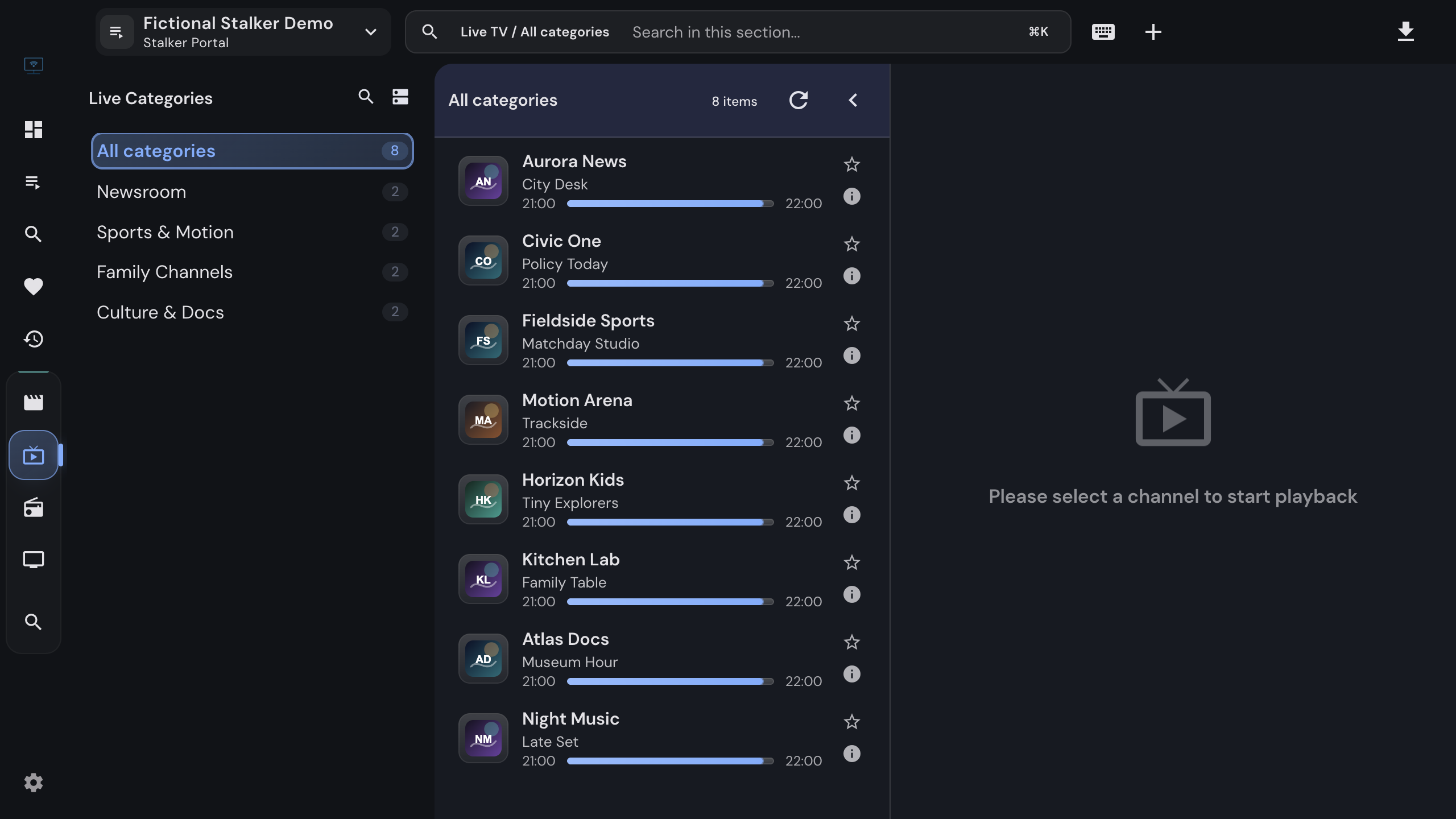
Stalker portals, also sold as Ministra portals, are the middleware that MAG set-top boxes talk to. Instead of a username and password, the portal knows your device by its MAC address, and everything else, from the channel list to the movie catalog and the program guide, comes from that one identity. IPTVnator behaves like a MAG box towards the portal, so a subscription meant for a set-top box or a set-top-box emulator works on your desktop too.
This guide covers what to enter, what IPTVnator does with it, and what the portal’s usual refusals mean. It applies to the desktop app on Windows, macOS and Linux and to the self-hosted browser version.
IPTVnator is a player, not a service
It does not include portals, channels or accounts. The portal URL and MAC address in this guide come from the provider you already have a contract with.
What you need from your provider
| Field | What it looks like | Notes |
|---|---|---|
| Portal URL | http://portal.example-provider.net/c |
A bare host, /c, portal.php or server/load.php all work. Must start with http:// or https://. |
| MAC address | 00:1A:79:12:34:56 |
Twelve hex digits. Dashes, dots and lowercase are corrected for you. |
| Username and password | optional | Only some Ministra portals ask for them. |
| Serial number, device IDs, signatures | optional | Only if the provider registered a specific box and told you the values. |
Most portals only accept MAC addresses from Infomir’s 00:1A:79 range, the manufacturer of
MAG boxes. IPTVnator shows a hint when an address is outside that range but does not refuse
it, because some reseller panels are configured differently.
Add the portal
In IPTVnator
- 1
Open the Add playlist dialog from the dashboard, the header playlist switcher, or the command palette entry "Add Stalker portal".
- 2
Choose the "Stalker portal" method.
- 3
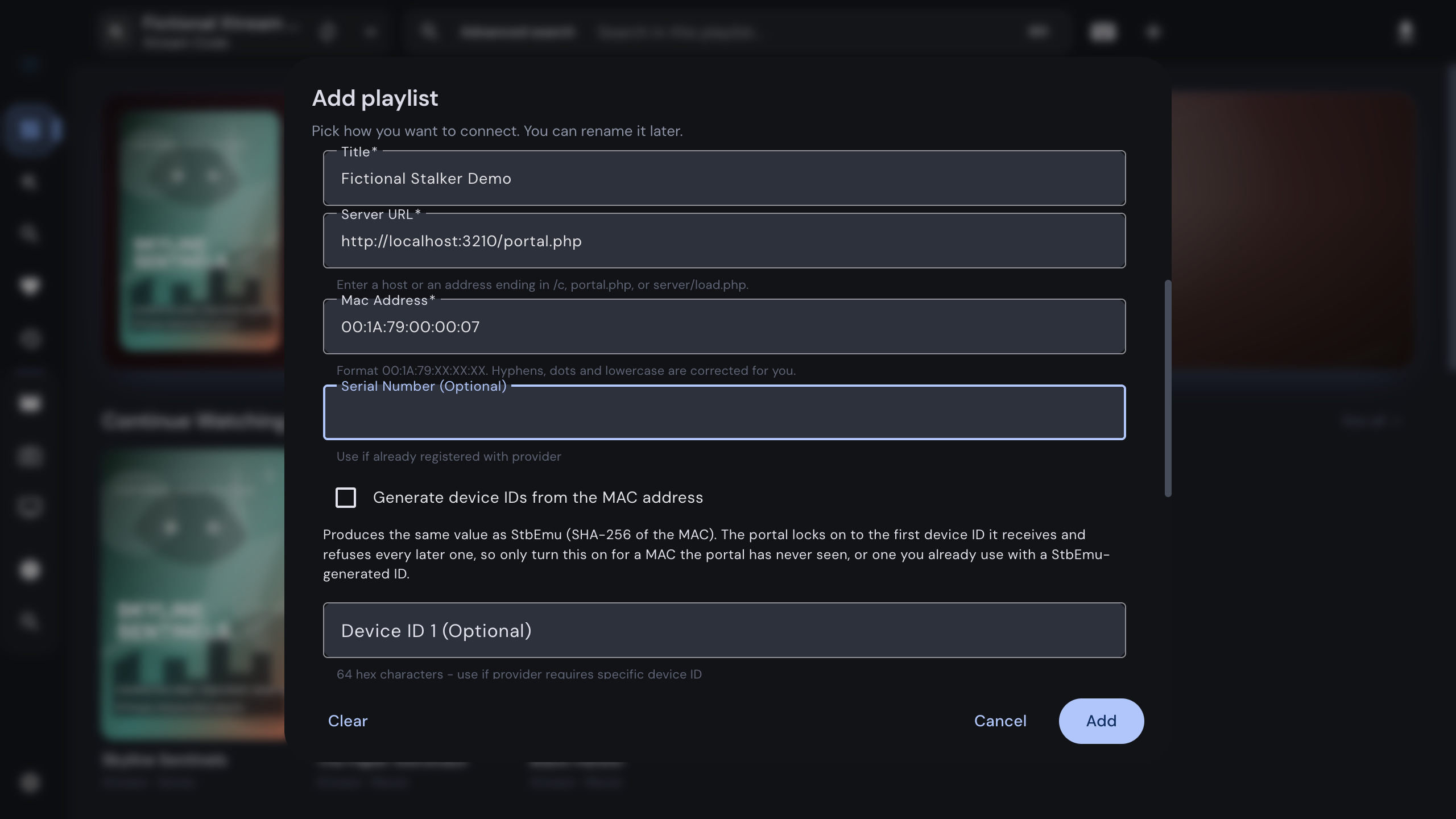
Fill in a playlist title of your choice, the portal URL in the "Server URL" field and the MAC address. Leave the optional fields empty unless your provider gave you values for them.
- 4
Click "Add playlist". IPTVnator probes the portal, authenticates with your MAC address, and opens the new source. "Validating portal…" can take a few seconds on slow servers.
Paste the provider message instead
The Auto-detect method in the same dialog reads a pasted email or chat message. A MAC address is its strongest signal, so a message with a portal link and a MAC address pre-fills the Stalker form for you. You still click Add playlist yourself.
What happens when you click Add playlist
Providers write portal addresses in a dozen shapes, and the same host can run a strict Ministra middleware or a tolerant reseller panel. Guessing from the URL used to break real setups, so IPTVnator no longer guesses:
- It tries the address you entered, then the usual endpoints behind it (
portal.php,server/load.php,stalker_portal/server/load.php) in order. - For each one it observes how the portal behaves. A portal that hands out data without a token is a simple panel; a portal that demands the handshake token is a full Ministra portal, and IPTVnator completes the handshake and reads your profile to confirm it.
- The endpoint and mode that worked are saved with the source. Later requests use exactly that address, and if a provider migrates the portal, IPTVnator re-probes once on the first failure and repairs the stored connection.
On a full portal the profile also carries your subscription facts. When they include an expiry date, IPTVnator confirms the import with “Portal validated” and that date; an account without a fixed expiry is added without that notice. A portal that cannot be reached during the import is still added when the address looks like a panel, with a notice that it was added without validation, so a temporarily offline provider does not block you; the next successful request completes the setup.
After the import
The source gets its own sidebar:
- Live TV: categories on the left, channels with the current program and a progress bar, the player and a timeline of the schedule. IPTVnator loads the complete channel list once per session, so search covers every channel and not only the pages the portal has served so far. Channels the portal marks as archived can be played from the timeline.
- Radio: portal radio stations in a dedicated audio layout, always through the built-in player.
- Movies and Series: poster grids per category and a detail page with description, cast, trailer and similar titles. Series come in the three shapes portals use, regular series, movies with embedded episodes and Ministra’s lazily loaded seasons, and all three render as seasons and episodes with resume positions and watched markers. The desktop app adds a download button for offline viewing.
- Search, Favorites and Recent for the source. Global favorites, recent items and search on the dashboard combine all your sources.
- Discover, when TMDB metadata is enabled in the settings.
Program guide
IPTVnator asks the portal for a seven-day schedule once per session and shows it in the channel list and in the timeline under the player. If a channel shows nothing, the portal did not publish a schedule for it. The desktop app additionally uses XMLTV sources configured under Settings › EPG as a fallback, and a right-click on a channel offers “Map EPG channel” to link it to an XMLTV channel by hand.
Check the subscription
Open Account info from the playlist switcher in the header or from the source card on the dashboard. IPTVnator shows the data saved during the import immediately, marked as saved data, then refreshes it from the portal: status, login, tariff plan, expiry date with a days-left counter, the MAC address and the portal details. The source card on the dashboard carries a small expiry chip that turns amber during the last week of the subscription.
Device identity, explained
A real MAG box reports more than its MAC address: a serial number, two device IDs and two signatures. IPTVnator sends only what you typed. Empty fields stay empty, nothing is invented behind your back, and that matters because of how portals treat device IDs:
- The portal pins the first device ID it receives to the MAC address and refuses every later one. A later empty value locks the MAC out for good.
- Generate device IDs from the MAC address produces the same pair StbEmu generates, so a MAC you already use there keeps working. It is offered at import only, writes the values into the visible fields, and re-derives them if you correct the MAC before clicking Add playlist.
- Once a device ID is stored, the playlist details dialog warns before you change or clear it, because the portal will not accept the new value.
If your provider registered the box for you and sent a serial number or device IDs, enter exactly those values.
Troubleshooting
When the portal refuses the import, the dialog stays open and shows the reason under the portal URL, followed by the portal’s own words when it sent any. Editing a field clears it.
- The portal requires a login and password: fill in the optional username and password fields and click Add playlist again. Some Ministra portals demand a login on top of the MAC address.
- The portal rejected the login and password: the credentials are wrong or the subscription lapsed; the portal’s own message follows the headline.
- The portal has a different device ID registered for this MAC address: another box or emulator authenticated first. Restore the device ID you used there, or ask the provider to reset the device for this MAC.
- The portal refused access for this device: the account is blocked or expired, or the MAC address is not registered. The portal’s own message tells you which; contact the provider.
- Failed to authenticate with the portal. Check the URL and MAC address: the host did not answer on any of the probed endpoints. Check the address, the network or the VPN, and try again.
- Channels load but nothing plays: the built-in web players cannot decode every codec. Open the stream in MPV or VLC via Settings › Playback, or enable the experimental embedded MPV engine. IPTVnator resolves a fresh temporary link from the portal for every playback, so a stream that stopped working usually works again after re-selecting the channel.
- The catalog looks stale: portals paginate their lists. Use the refresh action in the live TV header to reload the complete channel list, and re-open a category to fetch its content again.
Related
Windows, macOS and Linux builds, package managers and the browser version.
The username-and-password way of connecting a provider.
Plain playlists, refresh options and XMLTV guides.
FAQ
Frequently asked questions
What is the difference between a Stalker portal and an Xtream Codes account?+
Both are ways a provider hands you access. Xtream Codes identifies you by username and password against an API. A Stalker or Ministra portal identifies a set-top box by its MAC address against a middleware server, the way MAG boxes and set-top-box emulators work. If your provider gave you a portal URL and a MAC address, you have a Stalker portal.
Which portal URL should I enter?+
Whatever your provider gave you, as long as it starts with http or https. A bare host, an address ending in /c, portal.php, or server/load.php all work. IPTVnator probes the usual endpoints behind that address and keeps the one that answers, so you rarely need to guess the exact path.
The provider's MAC address is written with dashes or in lowercase. Does it matter?+
No. IPTVnator normalizes hyphens, dots, spaces and lowercase letters into the canonical 00:1A:79:XX:XX:XX form when you leave the field, and again when you click Add playlist. The bytes stay the same, so the portal sees the address it registered.
Should I turn on "Generate device IDs from the MAC address"?+
Only for a MAC the portal has never seen, or one you already use in StbEmu with generated IDs. A portal pins the first device ID it receives to the MAC and refuses any other one afterwards, so enabling it for an existing box with a different ID locks the account out. If your provider did not mention device IDs, leave the option off.
Why does IPTVnator ask for a username and password on some portals?+
A few Ministra portals require a login on top of the MAC address. IPTVnator reports "This portal requires a login and password" under the portal URL when it sees that; fill in the two optional fields and click Add playlist again. Portals that never ask for it ignore the fields.
Does IPTVnator show a program guide and catch-up for portal channels?+
Yes. It loads the portal's seven-day schedule once per session and shows the current program in the channel list and a timeline under the player. Channels the portal marks as archived can be played from the timeline. On the desktop app, XMLTV sources configured in the settings act as a fallback.
Where can I see when my portal subscription expires?+
Open Account info from the playlist switcher in the header or from the source card on the dashboard. It shows status, login, tariff plan, expiry date with a days-left counter, and portal details, using the data saved at import when the portal cannot be reached.
Comments
Comments are hosted in GitHub Discussions. Loading them contacts giscus.app and github.com; nothing is requested from them until you choose to.