
Alternative Sources in IPTVnator - The Same Movie from Another Playlist
When a film exists in more than one of your Xtream Codes playlists, IPTVnator shows a Sources chip. How to compare the copies, switch mid-film without losing your place, pin a preferred playlist, and let the app switch on its own when a stream dies.

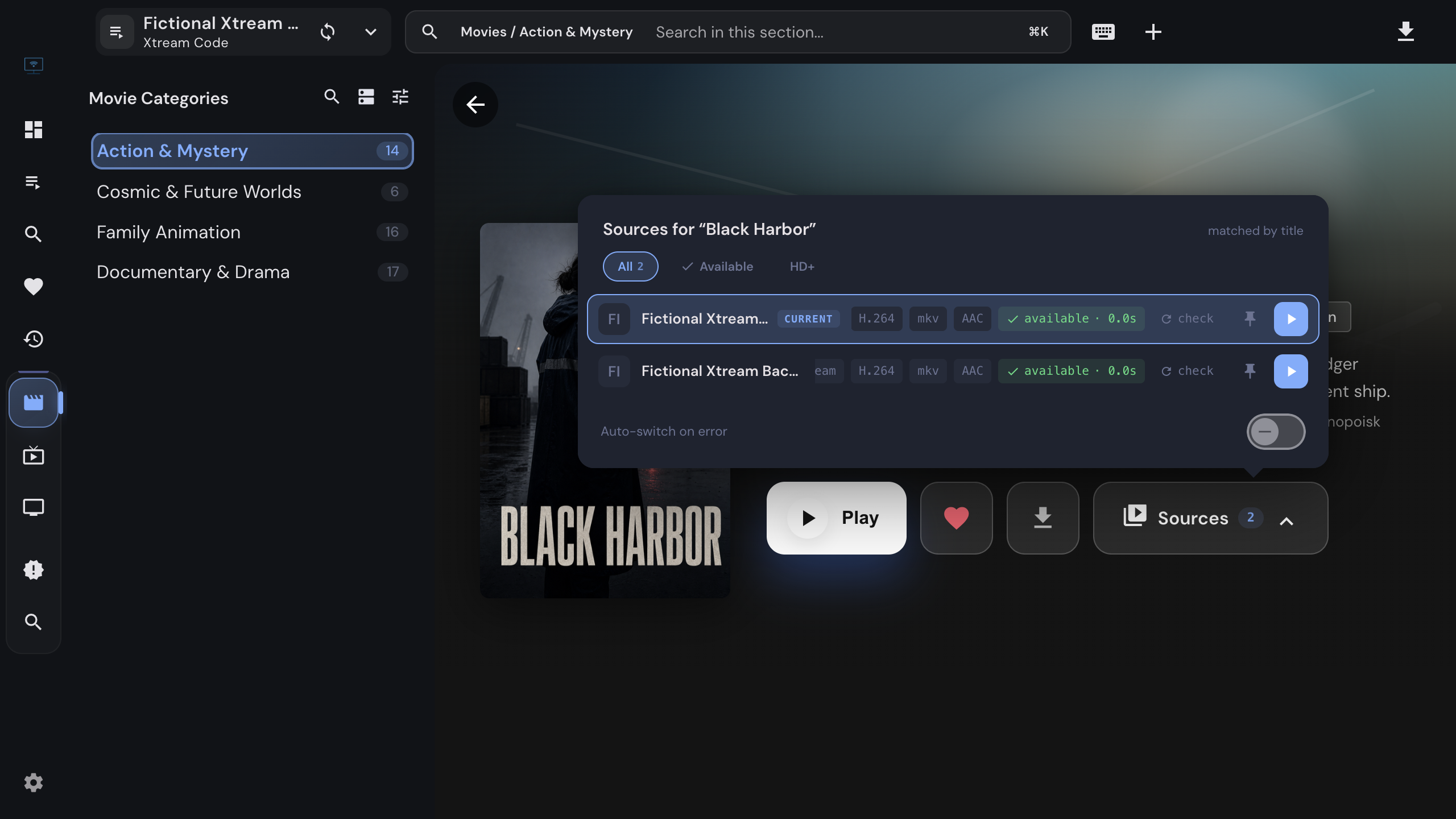
Many people keep more than one subscription: a main one and a cheaper backup, or two providers that cover different countries. Their movie catalogs overlap, and when a stream from one dies at minute 40 the other one usually plays fine. Before v0.23 that meant leaving the film, opening the other playlist, finding the same title and scrubbing back. Now the detail page does the finding, and the switch keeps your place.
This guide covers what the Sources chip shows, how to switch by hand, how to make one playlist the default for a movie, and when the app may switch on its own. It applies to the desktop app on Windows, macOS and Linux; movies from Xtream Codes sources only for now.
IPTVnator is a player, not a service
Where the chip comes from
Open any movie. If the same film exists in at least one other Xtream Codes playlist you added, the action row under the poster gains a Sources chip with the number of copies the app found. Once the film plays, a line under the buttons says which playlist it is playing from and how many others have the title.
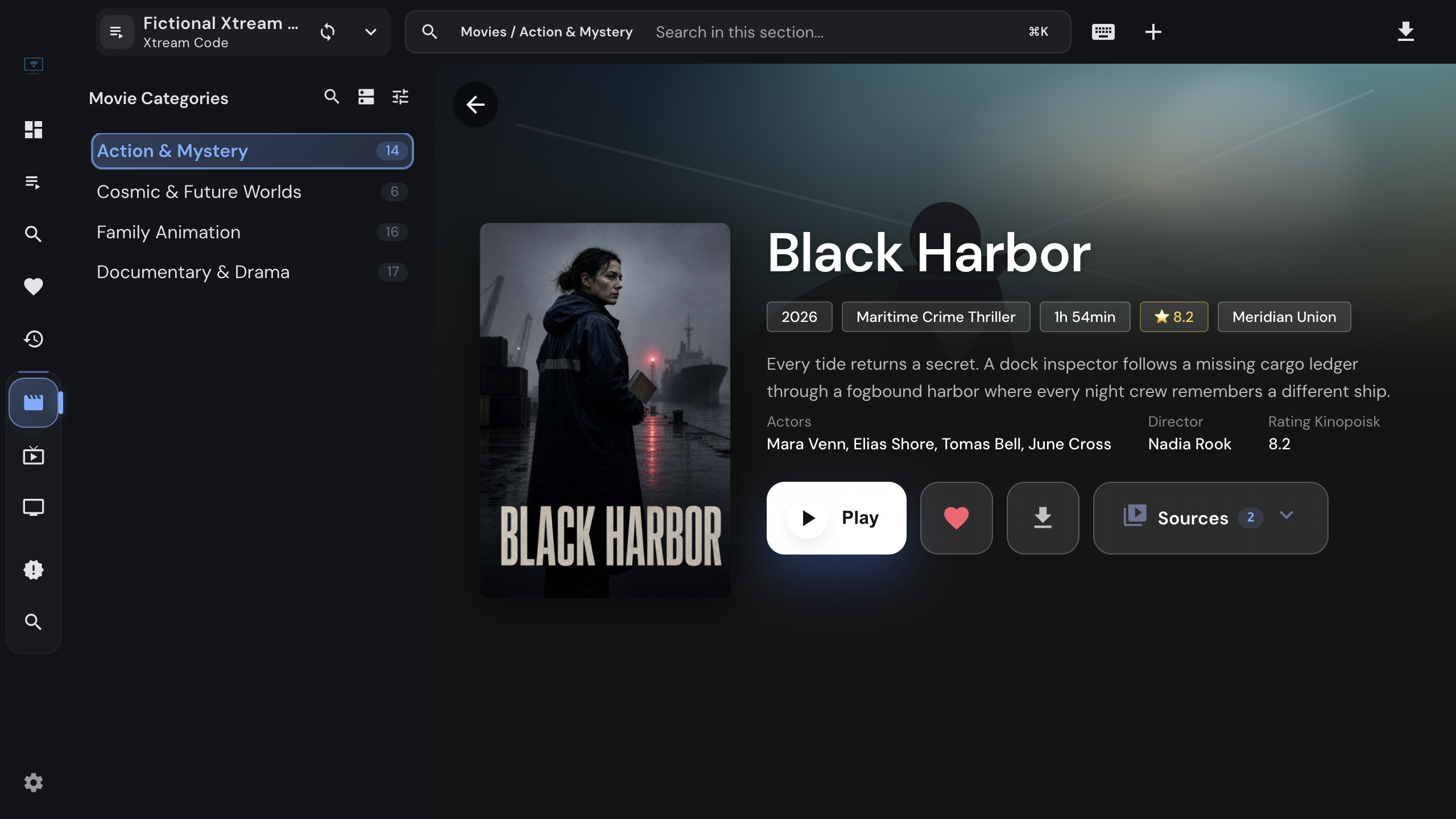
The lookup is local and lazy. It runs against the catalog cache on your disk when the page opens, matches copies by title, and by TMDB identity when metadata enrichment is on, and it never contacts a provider until you ask for a check. A copy whose title states a different year is treated as a different film: Dune (1984) is not an alternative for the 2021 one.
Scope for now
Xtream Codes to Xtream Codes, movies only, desktop app only. Series, Stalker portals and M3U playlists do not get a chip yet, and the browser version never shows one.
Compare the copies
Click the chip to open the sources popover.
Each playlist is a group; a playlist that holds several copies of the same film lists them under one heading. A row shows what is known about that copy:
- Plain tags are facts: the container, codec, audio and resolution the provider’s API reported, or the result of a check.
- Tags starting with
~are guesses read out of the stream title, such as~1080pfrom a name that ends in “1080p”. They help you browse, but the app never uses a guess to decide anything on its own. - check means the copy has not been contacted yet. It is not offline; nobody asked.
Check all contacts every unchecked copy: one metadata request to that playlist’s portal and one HEAD request to the stream, sent with that playlist’s own playback headers. The row then reads available with the response time, or unavailable. Verdicts are kept for ten minutes, so reopening the page does not repeat the requests.
The chips above the list narrow it down: Available keeps verified copies only (and runs the check for you when nothing has been checked yet), HD+ keeps copies tagged 1080p or better, and the language select lists the languages the titles or category names actually carry. The search box filters by playlist name.
Switch while watching
Change the playlist mid-film
- 1
While the movie plays, open the Sources chip; it also sits in the bar under the player.
- 2
Pick a copy and choose "Play from this source".
- 3
Playback continues from the same timecode on the other playlist. A toast names the new source and offers Undo.
The player is not rebuilt, so fullscreen survives the switch. Every copy keeps its own saved position afterwards: the progress you make on the backup playlist is stored under that playlist, and resuming later from either one continues where that copy stopped.
If the toast adds the dub may differ, both copies stated their audio language as a fact and the languages differ. No warning does not mean the dubs match; it means the app does not know.
Make one playlist the default for a movie
Make this the main source on a row pins that copy. From then on the movie’s Play and Resume buttons start from the pinned playlist, whichever playlist you opened the page in, and the pin survives restarts. The pin is per movie: a backup playlist that is better for one film is not made the default for your whole library. Unpin this source removes it.
Resume follows the pin
The primary button shows the pinned copy’s own position. A film you finished on the backup playlist reads Play, not Resume, even if the main playlist’s copy is still half-watched.
When a stream dies
If playback fails and other copies exist, the error screen lists them instead of a dead end: pick one and the film continues at the same timecode. That works with every player.
Auto-switch on error goes one step further and picks the next copy for you. It is off by default and can be turned on in Settings under Playback or with the toggle at the bottom of the Sources popover. When it is on and a stream fails:
- copies that already failed this session are skipped,
- a copy that was checked and found available is preferred, and a pinned copy wins,
- the switch is announced with a toast, an Undo button and the dub warning where it applies.
Each copy is tried at most once per session, so a movie with three copies switches at most twice and then shows the normal error screen. The setting only appears with the built-in web players, because only they report a failure to the app; Embedded MPV, MPV and VLC play on their own and cannot trigger it.
Good to know
- The chip counts copies, the caption counts playlists. Two copies in one backup playlist read “Sources 3” and “also found in 1 other playlist”.
- Checks and switches use each playlist’s own credentials and headers. Nothing from one subscription is sent to the other provider.
- A downloaded movie keeps its Sources chip: provider playback of an offline title still goes through the popover.
Related
Add the second playlist that turns a movie into one with alternatives.
What a playback failure means and when a different player is the fix.
The desktop app for Windows, macOS and Linux.
FAQ
Frequently asked questions
Does IPTVnator search the internet for other copies of a movie?+
No. It only looks inside the playlists you added yourself, and only in the local catalog cache of the desktop app. Nothing is queried outside your own sources, and the app never suggests providers or content it does not already have on disk.
Why does a movie show no Sources chip?+
The chip needs at least one copy in another Xtream Codes playlist of yours. It is not shown for series, for Stalker portals or M3U playlists, or in the browser version. Two copies also have to match by title, or by TMDB identity when metadata enrichment is on; a copy whose title carries a different year is treated as a different film on purpose.
What does Check availability actually do?+
It asks the other playlist's portal for the stream details and sends one HEAD request to the stream address with that playlist's own playback headers. That is a request against your own subscription, not a stream, and the verdict is remembered for ten minutes. Nothing is checked until you ask, so an unchecked copy is shown without a verdict rather than as offline.
Do I lose my position when I switch playlists mid-film?+
No. The switch carries the current timecode to the other copy, and the player keeps running instead of being rebuilt. Each copy keeps its own saved position afterwards, so resuming later from either playlist continues where that copy stopped.
What does pinning a source change?+
The Play button of that movie starts from the pinned playlist instead of the one you opened the page in, and the pin survives restarts. It applies to that one movie only; there is no global playlist priority.
Why does the app warn that the dub may differ?+
Two copies of a film can carry different audio tracks. IPTVnator warns only when both copies state their audio language as a fact from the provider, never from a guess read out of the title. If no warning appears, the languages are unknown, not confirmed equal.
Which players support automatic switching?+
The built-in web players (HTML5, Video.js and ArtPlayer), because only they report a playback failure back to the app. With Embedded MPV or an external MPV or VLC the setting is hidden, and you switch by hand through the Sources chip.
Is auto-switch on by default?+
No. It is off until you enable it in Settings under Playback or in the Sources popover. Even then the switch is always announced with an Undo, and it tries each copy at most once per session before showing the normal error screen.
Comments
Comments are hosted in GitHub Discussions. Loading them contacts giscus.app and github.com; nothing is requested from them until you choose to.